"Watch and share "A Day Made of Glass 2: Unpacked," to see how Corning's highly engineered glass, with companion technologies, will help shape our world. Take a journey with our narrator for details on these technologies, answers to your questions, and to learn about what's possible -- and what's not -- in the near future." -Corning Incorporated
I'll have to admit, I no longer consider myself an early adopter. I put off exploring the Google Chrome Web Store until.... today. Most of my recent explorations have centered on discovering great apps for my iDevices, but since I'm a cross-platform, cross-device, transmedia type of person, I could not neglect the world of interactive web apps!
Here is a screen shot of the educational web apps from the Google Chrome Web Store:
After you select a few web apps, you can access them from your Chrome browser by selecting a new tab or new window. The screen shot below shows the apps I've currently chosen to explore:
I have an HP TouchSmart, and I found that many of the web app worked out OK with touch interaction, even 3D "rotate and pan". My hunch is that many of the web apps will work fine on an interactive whiteboard.
I took a quick look at the MeeGenius! Children's Books interactive web app and was pleasantly surprised. This web app is a talking book that highlights each word as it is spoken. A human voice is used for the narration.
I'm looking forward to getting into work early on Monday to see what web apps work well on the SMARTboard!
Multitouch Display for Business Science Park Aurorum, by NUITEQ
"NUITEQ developed a customized multi-touch software solution for Corporate Reception / Lounge Areas for Business Science Park Aurorum in Luleå, based on the award-winning Snowflake Suite framework. In addition to the software, NUITEQ delivered and installed a 32 touch points multitouch dreaMTouch LCD from Germany based Elektrosil."-NUITEQ
"Virtual anatomy surface computer in the shape of autopsy table that show and enable the user to use hand gestures to do the anatomy process virtually."-Innovation Now
I've been revisiting the topic of interaction design/usability for "touchable/moveable" multimedia content for the past couple of weeks. I recently got an iPad2, so I'm in the "app" exploration phase - a new world, since I never had an iPhone, iPod touch, or iPad "1".
I plan to share experiences, thoughts, opinions, and suggestions related to this topic during the upcoming months. I welcome input from IMT readers!
Getting back to my iPad2....In addition to using the device to run apps, like most people, I also use it to visit websites. Many sites now appear to be optimized for mobile devices, which is great for my Android-based smartphone, but for my iPad, not so much. I thought by now we'd have more touchy-feely content to play with.
I've noticed that basic features that work OK with touch interaction, such as the carousel, seem to miss the target, as discussed in the following article:
Although the above article was written from a "click" rather than "touch" perspective, many of the comments Anthony brings up ring true for websites and apps that are accessed through tablets and other touch enable screens.
I'm disappointed. Here are a few of my grumbles:
Many designers/developers have been slow to look at the increasing number of people who are accessing websites and applications via touch-enabled screens - of any size.
Many designers/developers have been slow to catch on that a website or app might be viewed/used by more than one person at a time. Websites for house-hunting, home furnishings, vacation/travel, and education are a few examples that come to mind.
Too many "multimedia" apps/websites are flat. Many still have a power-pointy feel.
Websites optimized for mobile devices often leave important features out.
Designers/developers sometimes don't seem to think about the various scenarios in which their applications/websites might be used - while balancing a baby on one hip, preparing a meal, working out, walking the dog, trotting around the mall with a friends/kids/spouse, eating, waiting at a stop light, etc.
Too many iPad apps are flat and power-pointy. Too many apps don't take full advantage multi-touch features. Very few apps allow for efficient interaction between two people on the screen.
"The Newseum -- a 250,000-square-foot museum of news -- offers visitors an experience that blends five centuries of news history with up-to-the-second technology and hands-on exhibits. Within its seven levels of galleries and theaters, the Newseum offers a unique environment that takes museum-goers behind the scens to experience how and why news is made."
"The Newseum is one of the most technologically advanced museums in the world. The Newseum ordered 100 miles of fiber-optic cable to link up-to-the-second technologies that include electronic signage and interactive kiosks, two broadcast studios, 15 theaters and a 40-by-22-foot high-resolution media screen."
Below are some examples of what visitors can experience at the Newseum, located in Washington, D.C.:
Bloomberg Internet, TV and Radio Gallery -Newseum Time Warner World News Gallery -Newseum
The New York Times --Ochs-Sulzberger Family Great Hall of News Surrounded by the flow of information -Newseum "Around, above and below, visitors to the Great Hall of News are surrounded by a continuous flow of news. Instant, breaking, historic news that is uncensored, diverse and free."
"In this 7,000-square-foot interactive gallery, visitors can select any of 48 interactive kiosks or experiences where they can immerse themselves in the many roles -photojournalist, editor, reporter, anchor — required to bring the news to the public. The gallery features eight “Be a TV Reporter” stations that allow visitors to choose from a variety of video backdrops, take their place in front of the screen, read their report from a TelePrompter and see themselves in action." -Newseum
NEWSEUM exhibits have an on-line component. Here are a few:
Megan Slankard and her band performing "Sails", from the album "a little extra sun":
"To put its technology to the artistic test, NextWindow introduced Megan Slankard and her band to the freedom of creating music using touch screens. With 13 touch screens manufactured by NextWindow – seven 46-inch screens and six All-in-One desktop touch computers – Megan and her band set out to create a music video with a touch of technology they’ve never utilized before."-NextWindow
For detailed information about the touch screens and music applications shown in the video below, visit the Music on Touch Screens page of NextWindow's website. The website shows a good "behind the scenes" video of the various band members exploring the touch screens used to create the music in the video.
During today's visit to Best Buy, I noticed that there were more display centers in various departments in the store, and many of the displays had useful and informative content. The Kinect demo was up and running, too.
Within the store, I noticed a strong emphasis on HDTVs with internet capabilities. I was hoping that the new Internet HDTVs would come with user-friendly touch-screen controllers, or at least an app for use on touch-screen smartphones, iPads, or other touch-screen tablets.
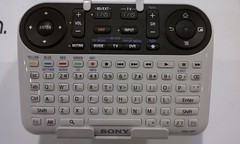
What I found was disappointing. On display were traditional-looking multi-button remote controllers, controllers that looked like PC keyboards, and of course, Sony's confusing multi-featured contribution to the Internet TV scene.
None of the controllers seemed to be easy-to-use, or capable of supporting web-navigation and other web interactions on HDTVs from a distance, especially when the goal is to watch movies and video from a recliner in a darkened family room.
Below is a partially annotated slideshow of pictures I took of some of the displays and other things I encountered at Best Buy. Enjoy!
Close Encounter with Kinect Bowling It wasn't easy trying to bowl and take video with a phone at the same time! (Please excuse the shaky video effects and the view of my fingers.)
"If a "Minority Report" future was possible, and if it is coming, how do we create a model of it that is not intrusive, that is fun to play with, that is social, that is respectful and not intrusive, that doesn't invade people's privacy?" -Jason Sosa, CEO, Immersive Labs
Future of Advertising Technology (Immersive Labs demo from 2 years ago)
"The Touch Interface specification defines a set of low-level events that represent one or more points of contact with a touch-sensitive surface, and changes of those points with respect to the surface and any DOM elements displayed upon it (e.g. for touch screens) or associated with it (e.g. for drawing tablets without displays). It also addresses pen-tablet devices, such as drawing tablets, with consideration toward stylus capabilities."
Following a link from Nathan Yau's recent Flowing Data blog post, Our Changing World in Cartograms, I discovered that FedEx's "Our Changing World" website. It provides an interesting way to explore data about various countries by mousing over countries on a map.
I have an HP TouchSmart PC, and found that the touch-screen interaction offered by this website was better than using the mouse. I'm pretty sure that this website would be fun to use on a larger touch-enabled display, and in in the classroom, on interactive whiteboards.
To my surprise, I also discovered that the website offers a 3D augmented reality version of "Our Changing World": Experience the changing world in augmented reality "See the world and the information that shapes it. Watch it come to life as a 3-D hologram..."
(I'll play with the AR hologram later today.)
Note: The FedEx website provides links to additional resources for each topic area, as well as a link to the sources used for the data included in the information graphics. It is important to remember that graphics do not always accurately depict the numbers!
"At experience.fedex.com, visitors can interact through a world map with data and content provided by The Economist Intelligence Unit on eight world trends initially, including air travel, people in cities, entrepreneurs and success, paper trail, business growth, education, money and happiness, and research and development.Visitors also have an opportunity to analyze the data, share information, or participate in real-time, online polls....“At FedEx, we pride ourselves on our ability to offer great customer experiences,” said Malcolm Sullivan, vice president, Marketing, FedEx Express Asia Pacific. “Experience.fedex.com is an effective way for us to extend these experiences to the virtual world. By making visualizations of complex and important information available to people everywhere, FedEx makes it easy for anyone to learn about their world and share their discoveries with friends.”"
Here is artist Steven Lopez, sharing his NextWindow experience:
Here is a video from NextWindow's "Digital Art Day"- watch how four artists use various tools, including brushes, to interact with a NextWindow screen:
“A common method for creating digital art has incorporated pen-based tablet devices, connected to a PC. This approach required artists to look down at the tablet while they drew and look up at the image that was developing on the larger screen. Although artist’s adapted to this tech-heavy approach, it did not come close to the sensory experience of sketching on paper with pencil or using acrylics and watercolors to create a vast array of effects on canvas. Now, there are sophisticated touch screen PCs and applications that are helping artists bridge the "digital divide" between traditional art-making and computer-based art. A group of visual artists visited the NextWindow offices in 2010 for the opportunity to play with a touch PC and see how it affected the creative process.” -NextWindow/Polly Traylor
How it works (Info from the Reactable website) "The way the Reactable works is deeply inspired bymodular analogue synthesizerssuch as those developed by Bob Moog in the early 60s and enhances them with new concepts of sampling and digital effects processing." "While with modular synthesizers one typically had to connect these different modules with patch cables in a complex and error-prone process, with the Reactable this is attained in a much easier and more intuitive way, since connections between the blocks are managed automatically based on their types and affinities and on their proximity."
Martin Kaltenbrunner (Co-founder of Reactable) "His research concentrates on tangible user interfaces and the development of novel human computer interaction concepts within open tools for creative production. As co-founder of Reactable Systems he had been mainly working on the interaction design of the Reactable - an electronic musical instrument with a tangible user interface. He is author of the open source tangible interaction framework reacTIVision and the related TUIO protocol, which have been widely adopted for the realization of tangible tabletop applications."
IEEE Multimedia magazine online July-September 2010 Issue: Multimedia Innovations "This special issue addresses the notion that multimedia is a compelling field that provides a driving force behind most of today's technology innovations." Games Only Scratch the Surface: A Challenge for DevelopersLou Silverstein, Identity Mine In this article, Lou Silverstein discusses the latest news about Microsoft Surface and encourages developers to think about joining a dialogue on this topic.
This article is a gentle reminder, written for developers of traditional productivity software, about the importance of usability and understanding non-technical users.
The above photo is a screen shot of photos of just about every dog I know, and some that happened to cross my path. In this post, I'll share some information about how to create a photo-globe in Google Earth. I'll post a "how-to" video in the future.
The first step is to make sure you have lots of pictures related to your theme uploaded to a site such as Flickr. (You can also create a photo-globe using pictures from your computer's hard drive.)
To get the pictures into Google Earth, I used the Image Overlay feature, and in the "link" textbox, I entered the image URL for each picture that I'd previously loaded as a set in Flickr.
To do prepare for this, make sure you go to "view" tab on the upper left-hand section of your screen, and make sure that "toolbar" is checked. Also make sure that "Grid" is selection, as this will help make it easier to arrange and align your pictures. You can turn off this feature later. Near the top of the screen, click on the Image Overlay icon. (I've highlighted it in the picture.)
You'll have to enter the URL of the image you'd like to add to the globe in the "Link" textbox, which I've highlighted in the above picture. In this case, I've used a link to one of my pictures in a Flickr set I created for this project.
One thing to keep in mind is that the picture will take up a much larger space than you might prefer, so you'll have to adjust the size using the green markers:
Use the center cross-hair marker to slide the entire overlay on the globe and position it from the center. (Tip: do this first.)
Use the triangle marker to rotate the image for better placement.
Use any of the corner cross-hair markers to stretch or skew the selected corner. If you press the Shift key when selecting this marker, the image is scaled from the center.
Use any of the four side anchors to stretch the image in or out of from the selected side. If you press the Shift key when doing this, the image is scaled from the center.
TIP: Try positioning the center of the image as a reference point first, and then use the Shift key in combination with one of the anchors to scale the image for best positioning.
In Flickr, to get the image URL, go to the "share this" tab above the picture you'd like to put on the globe. You need to select the one that says "Grab the HTML", as shown below:
Select ONLY the code that comes after "src=" and before "width".
Then repeat. You can add place-marks that contain URLs that link to additional information about the subject of a picture, such as blog posts with embedded videos and/or text related to a picture, and so forth.
The process of building a photo-globe in Google Earth is a bit tedious. If someone has a short-cut to share, please let me know!
TAG GALAXY - A "shortcut": If you have a burning desire to create a quick photo-globe using random pictures, you see what the Tag Galaxy has to offer. Enter "dogs" or whatever theme you want for your photo-globe, and in an instant, it will be created from publicly available pictures from Flickr. The application uses the Flickr API.
Here is an example of a "Dog" Tag Galaxy:
You can spin the Tag Galaxy globe by using a mouse, or if you have a touch screen computer or a SMARTBoard, with your fingers.
Here is the slideshow from the pictures selected for the photo-globe:
Why is this important to me? The students at one of my schools started back last week, due to the school's "year-round" schedule. The students in this program have multiple special needs, including severe autism, and most learn best through visual and multimedia representations of information. I devote some of my spare time creating interactive content for the students, and I thought this might work out nicely.
To address the student's special learning needs, a number of new SMARTBoards were recently installed at the school, and now every classroom has an interactive whiteboard, including the room I usually use with students. We also have a few Dell Studio One All-in-One touch screen computers and a multi-touch SMARTTable. Interactive multimedia content works nicely on these screens! (I'm planning on making a "how-to" video when I get the chance.)
RESOURCES Google Earth Flickr Programmable Web (My hunch is that this site might provide some information about shortcuts for creating a photo-globe in Google Earth.)